Daily brief
Self-driving reports what it did in two places: your inbox and the app. This page covers both and the toggles that control the emails.
Two emails a day
For each repository running self-driving, Coldtea can send two emails a day. Each one goes out on the recipient's own timezone, so a teammate in another region gets it at their local morning and evening, not the repository's.
- Daily planner: the day's plan, in your inbox each morning, after the morning planner run, around 08:00 your local time.
- Daily brief: the end-of-day recap, in your inbox each evening, after the brief is written, around 18:00 your local time. If work is still finishing, the brief waits in short steps and can arrive as late as 19:00.
Email is how self-driving reaches you when the app is not open. There is no desktop or operating-system push; the two emails are the channel.
On a genuinely quiet day, when nothing was planned, run, or blocked, the brief email is skipped so an empty recap does not land in your inbox. The in-app brief is still written, so the home view always has the day's record.
The brief in the app
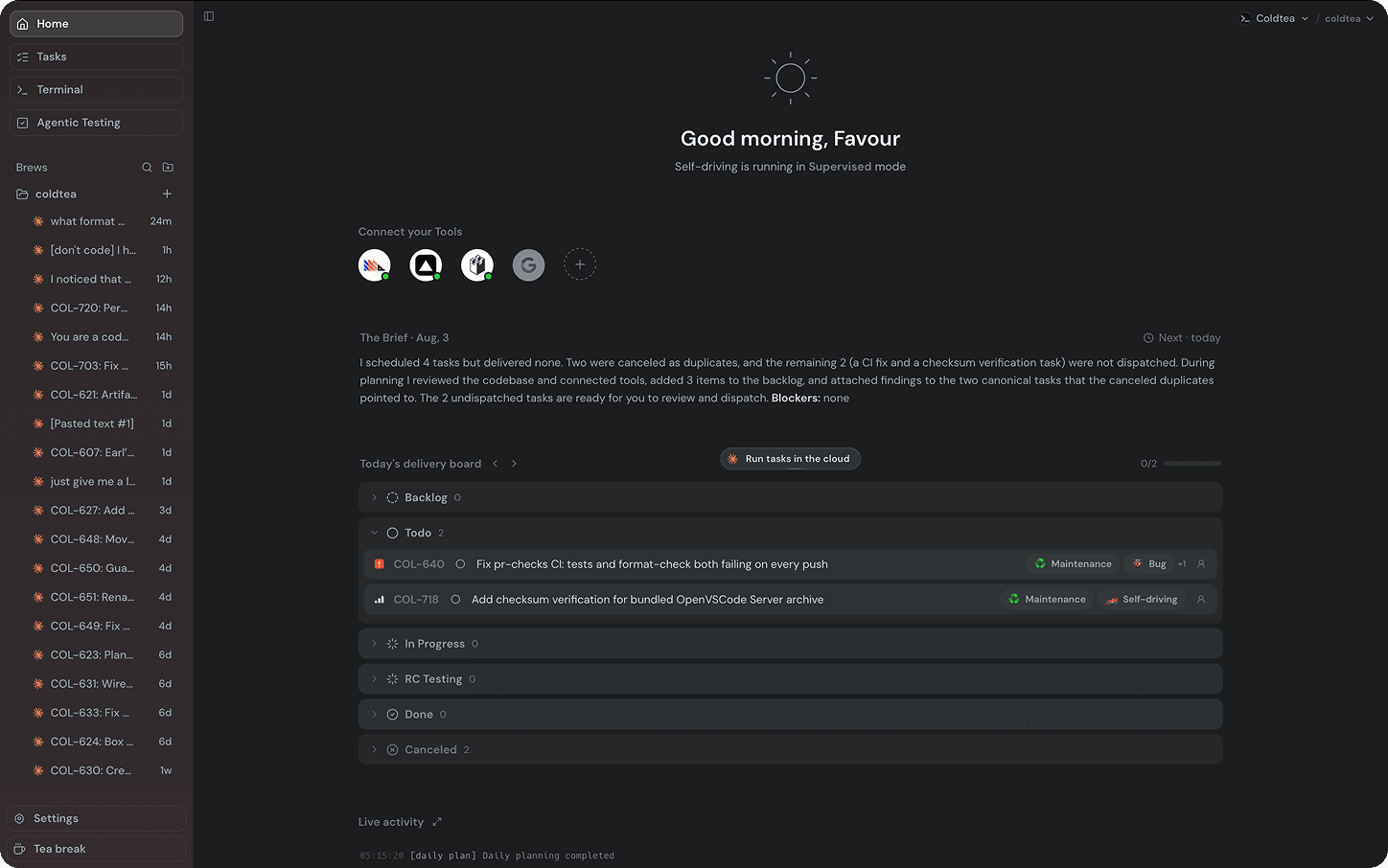
Open the self-driving home for a repository and you see the same brief in the app, under the heading "The Brief" with the day it covers and the date of the next one.
A standard brief reads as one short passage: what happened yesterday, what is planned for today, and what is blocked. On the first day, before there is any history, the brief is an empty state that names the project and waits for the first run.
Around the brief, the home view shows the day's filed tasks on a delivery board and a live activity feed of the run as it happens, so you can watch the planner and scouts settle without leaving the app.
Choose which emails you receive
The two emails are per-user subscriptions, set in the self-driving settings under Email. Each teammate controls their own:
- Daily brief controls the evening recap.
- Daily planner controls the morning plan.
Whoever set up self-driving for the repository is subscribed to both by default. Everyone else on the team starts unsubscribed and opts in. Your choice affects only your inbox: turning one off stops that email for you alone, not for the repository or your teammates, and the in-app brief is always there when you open the home view. You can subscribe to the morning plan for one project and only the evening recap for another.
What the brief is for
The brief is a record, not a verdict. It tells you what self-driving planned and ran so you can decide what to review and what to ship. Open the tasks it filed and review them the way you would review any agent work. A quiet brief is not proof that production is healthy; read it against the signals you have actually connected.