Reducing the cognitive load of AI-generated PRs
How we designed a higher proxy for keeping a shared mental model of a fast evolving software system

The following essay is 100% human written (validated on Pangram)
There’s a lot of argument on whether to read or not read code, with different people taking different stances.
I think it’s a silly argument.
I don’t care what you do, ultimately, if you ship production software to paying customers, you have an obligation to ship working, stable software.
Whatever gets you to satisfying that requirement, is yours to decide.
Trust is a fundamental human currency.
And the exchange of money for software relies on an unspoken trust that your customers get working software for the duration they’re paying for.
Whatever keeps that trust, and whichever method works for you, have at it.
In addition to this, If you work within a team, you have a more complex problem. One I’ll describe later.
For now, we still read code.
Not necessarily line by line.
The most important reasons why you used to read pull requests religiously
Humans are amazing.
We have what I think is true intelligence. We may not be the most intelligent specie in the galaxy, but we have a working functional model of intelligence.
So, beyond the fact that a certain pull request “works”, pre-AI we read code for different reasons.
The most human reason was keeping a mental model of the software you were building.
Unfortunately, the way our brain processes information requires a certain level of interaction with the world to construct a mental model.
Reading code is interaction that bred a working mental model of the software you maintained.
Why you used to read pull requests
most important first
- 1Mental modelcan’t automateHow the system was evolving.
- 2DesignautomatableDoes the change integrate well with the rest of the system?
- 3ComplexityautomatableIs this change more complex than it needs to be?
- 4Everything elseautomatableConsistency, documentation, well-written tests, style-guides.
Mental model
If you were responsible for its maintenance, a general idea of where the software was headed, architecture etc, was a great reason to read code.
You couldn’t develop a sound mental model of how the system worked otherwise.
Even more so when there are other people contributing to the same software / codebase.
Do you need to read every line for this, no. But you somehow needed to construct a mental model for how the system was evolving.
The operative word here is “evolving”.
Knowing the state of the software 3 months ago, was stale knowledge.
In the age of AI, that’s probably 1 week.
Stale.
That being said, at a high level there were other fairly good reasons to read code.
Design
When I worked as a Staff engineer at Hellofresh, the most important thing I looked for in a code review was the overall design of the PR.
Do the interactions make sense?
At a high level, does the change integrate well with the rest of the system?
Did I read every PR? No.
Sometimes reading an RFC was enough to not have to read the code. I understood at a high-level what was going on.
But I had to understand this somehow.
Even if writing code wasn’t the best use of my time on a day to day, there had to be a proxy for understanding the overall system.
Complexity
Typically you’re answering a simple question here: is this change more complex than it needs to be?
Maintenance used to be expensive, and an over-engineered solution was nearly as bad as no solution.
Maintenance is cheaper with agents, but not without costs.
Everything else
Everything else really came down to things you could fairly easily automate. Consistency, documentation, well-written tests, style-guides etc.
I don’t want to spend my time arguing over the naming of a function. No one does.
The one thing you can’t automate
Every production codebases is full of some artefact that instructs agents what to do.
Most people try to codify complexity requirements, how to open small PRs, Do’s and don’ts etc.
Arguably, every reason for reading code could be codified.
Complexity, design? Write up a Skill.
Then have a different LLM to the implementer review eventual output to make sure these were enforced. Then slap in some deterministic checks.
And you’re good to go.
This is all theoretical.
I’m yet to find a team that can prove that their coding agents are strictly rule abiding.
But even if you figured it out, there’s still one part you can’t truly automate.
How do you ensure everyone who contributes / maintains the software has something of a shared working mental model of how the software evolves?
You just can’t.
Our brains require some level of interaction to construct these mental models.
So where do you get this?
And how do you have that keep inline with the speed of PRs?
Moving the proxy higher
If reading the code was a proxy to constructing this mental model, what truly matters now for every pull request?
Or every change to a software system?
Understanding the overall system and the directional changes introduced to the underlying architecture
Here’s how we approach this.
Lens
To understand the overall system and make sure we’re aligned as a team and better able to jump in when needed, every pull request is accompanied with an automatic animated architecture and data flow diagram.
There are some very conscious decision we took here.
Rich visuals
To reduce cognitive overload, the designs are visually rich. Not just dark lines on white boxes.
See deletions, additions and changes in context
What services were touched, what was removed? Do I have to worry about this?
We wanted to see this immediately
So deletions, additions and changes are colour coded.
Overall system changes
There’s typically a core system being worked on in a PR, but changes affect more than the system involved.
It’s critical to capture this relationship. It can’t be isolated to one part of the system, since the whole point of this is to develop a rich mental model of the system.
Animated data flow
Typically, animations can be distracting. In this case, it’s an intentional tradeoff to maximise quick assimilation.
We want to see how the system moves.
So we can connect the dots faster.
Architecting lens
Given these requirements, a 10,000ft lens of the system is essentially an interaction between Github (where the eventual comment is posted), PR Lens (the system we’ve built), and a model provider
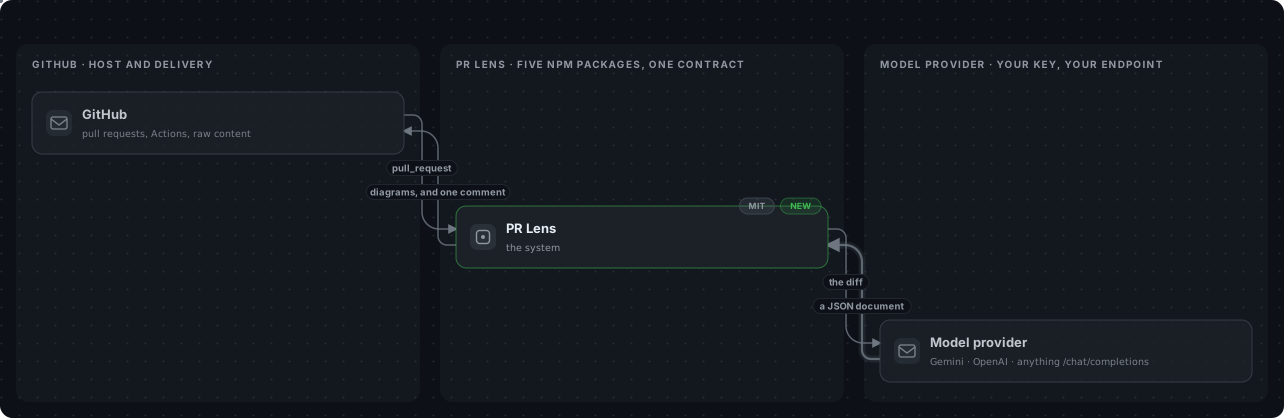
The way we’ve designed this is such that it plugs in to any model provider. I’ll show the architecture here shortly but as long as it is /chat/completions compatible, it’ll work.
This is what makes it possible to use this on the Cli, as a GitHub Action, and other mediums with BYOK.
An important (and seemingly obvious) part of the system is the output of the model provider is a strongly typed schema.
This allows for a level of determinism and validation against a structured spec.
A minimal valid JSON document looks like this:
{
  "schemaVersion": "0.1.0",
  "kind": "graph",
  "title": "Touch the health check",
  "lenses": ["architecture"],
  "provenance": {
    "repo": {
      "owner": "coldteadotai",
      "name": "pr-lens",
      "host": "github.com"
    },
    "base": { "sha": "1111111" },
    "head": { "sha": "2222222" }
  },
  "lanes": [{ "id": "api", "label": "API" }],
  "nodes": [
    {
      "id": "health-route",
      "label": "GET /health",
      "kind": "route",
      "delta": "modified",
      "lane": "api",
      "files": [{ "path": "src/routes/health.ts" }]
    }
  ],
  "edges": [],
  "flows": [],
  "views": []
}
If you open up the system further, you see how the dots connect.
To accurate map a change, we need some sort of baseline. So, the first time lens is run on a PR, this “baseline” is created and stored. Subsequent changes to the system are them modelled against this baseline, and the baseline updated on merge.
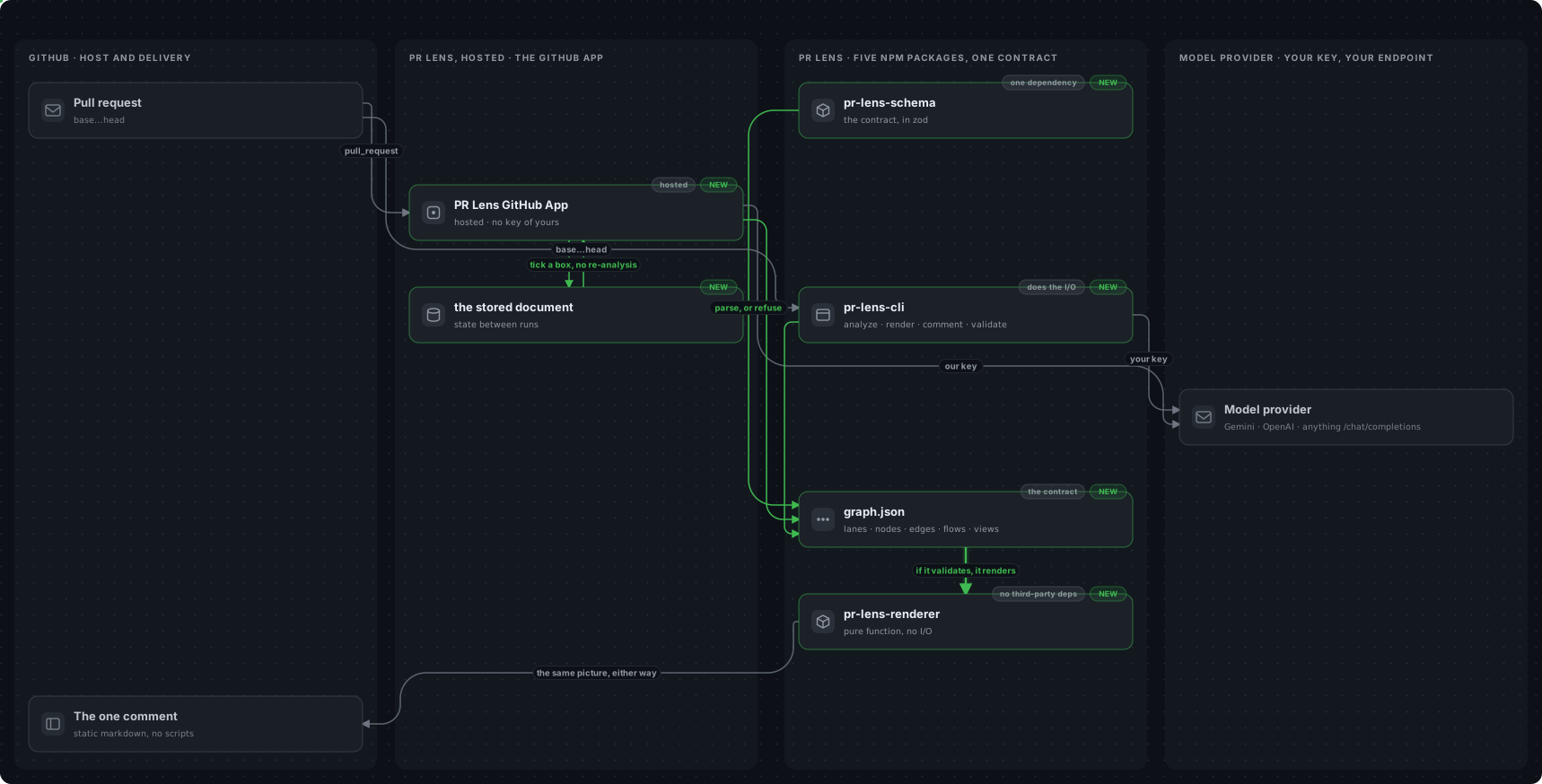
Storage here is Cloudflare’s R2. It’s a great choice here since we’re simply saving JSONs that need to be read rather frequently.
Most of our work is done locally. Not simply on pull requests. So this extends to supporting local coding agents as I alluded to earlier.
The system is easy to extend given that there’s a shared contract, the JSON document, the goal of every surface is to essentially create this JSON, then the renderer determinsitically does the rendering.
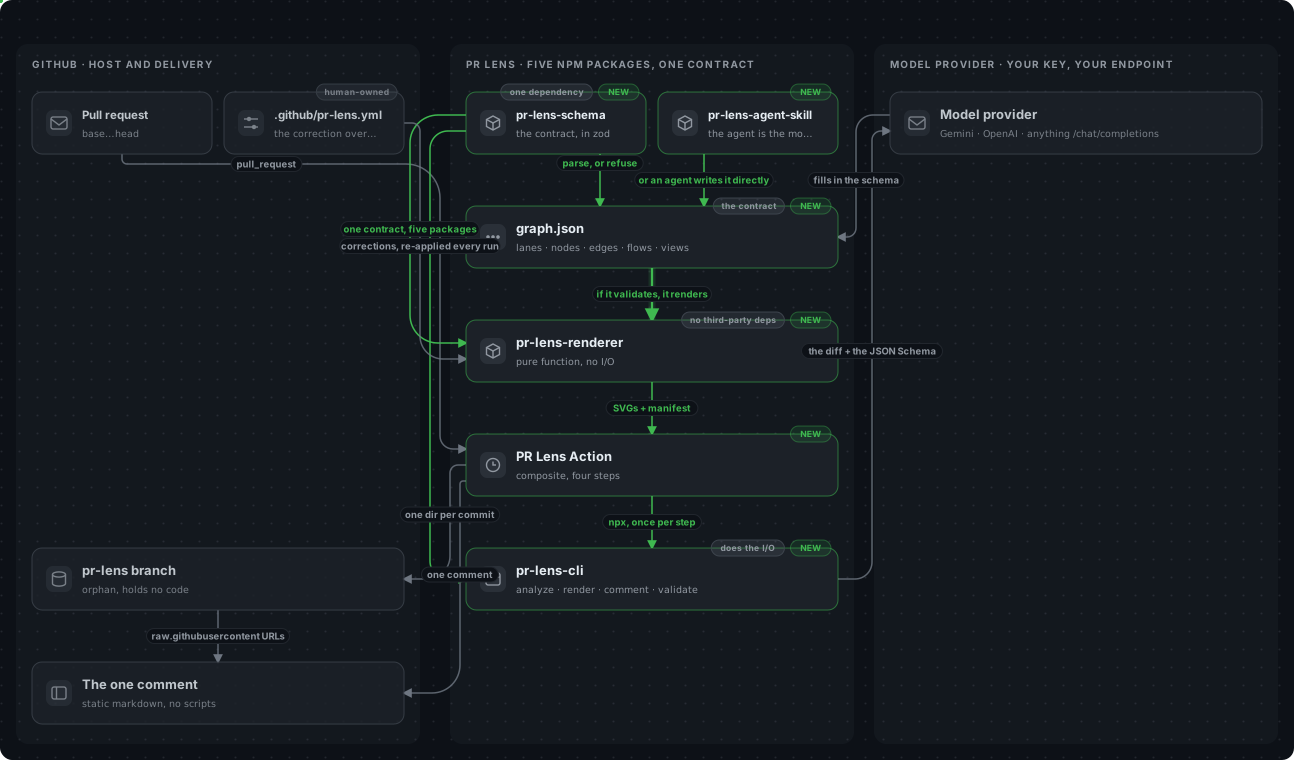
If you look to the top left of the diagram above, you’ll also notice a pr-lens.yml file.
We keep this locally to tweak changes to the architecture. This bit is human owned and we can always override whatever we think is the right representation of the current state of the system.
How the renderer works
The renderer is arguably the best part of the system. Or the part that makes everything else possible.
In simplest terms, the input to the renderer is the JSON document already validated against the shared schema, and the output is an SVG with the lanes, colour coding and animations baked in.
It’s a pure function, so no zero third party dependencies. The only dependency is the shared schema required for everything else.
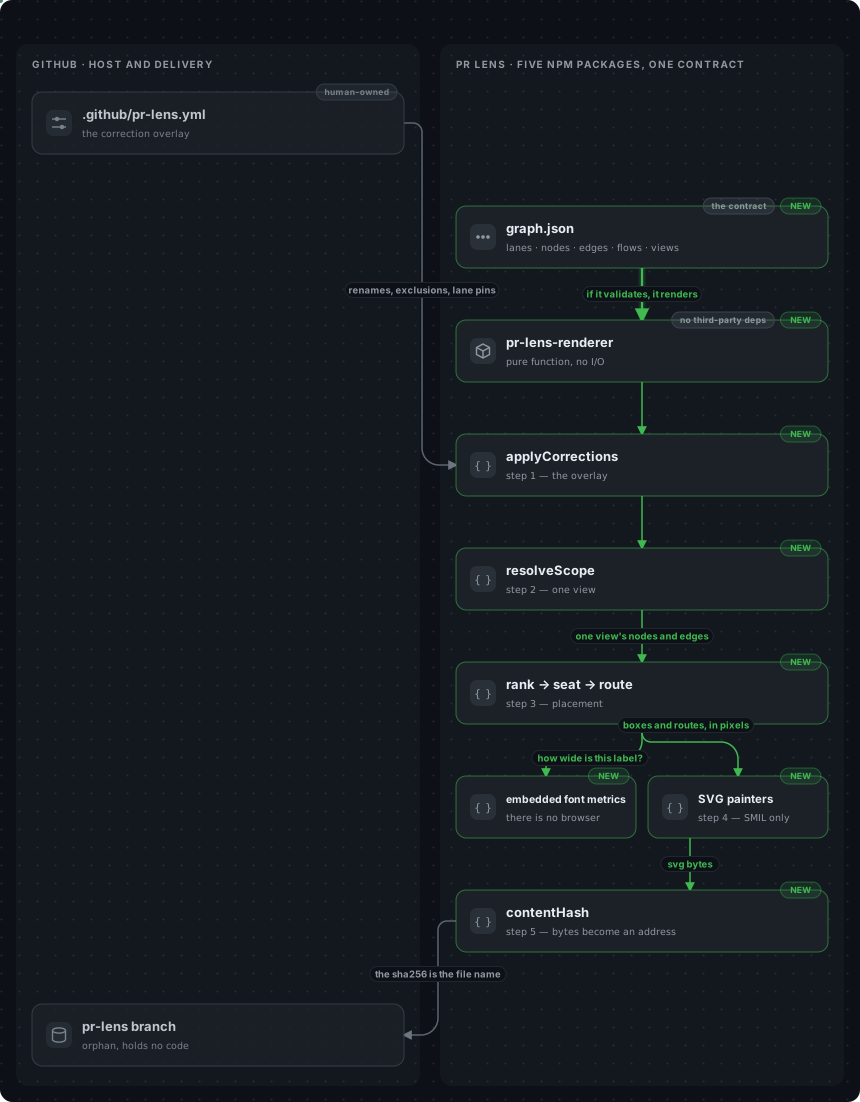
If you start at the end, the contentHash exists because Github copies comment images onto their servers.
So after a commit is pushed to update a PR, we need to keep the diagram updated (incase there’s a change). For the new image to be reflected, the eventual name of the image contains a hash like context-dark-${hash}.svg.
This is classic cache bursting, nothing crazy here.
How does Github animate this?
It doesn’t.
If you’ve played around the Github comments, you know Javascript is rightly stripped out.
This is primarily why the eventual output is an SVG. It comes with the added benefit of being somewhat accessible. You can select the texts in the diagram contrary to a static image.
Just being an SVG doesn’t tell the story. For the animations to work, since we can’t script we rely heavily on Synchronized Multimedia Integration Language (SMIL).
If you don’t know what that is, I had no idea until I started researching how to build this.
In simple terms, Its a W3C spec for declarative animations. This shows up as markup like <animate>, <animateTransform> , <animateMotion> etc. within the SVG. So it’s part of the document.
No scripts.
We use animateMotion specifically.
A really simple example would be say the following JSON comes in:
{
  "id": "api-db",
  "from": "api",
  "to": "db",
  "kind": "data",
  "delta": "added",
  "label": "write",
  "animated": true
}
Then we transform that into:
<g>
  <path
    class="edge edge-added"
    d="M218,144 L218,196"
    marker-end="url(#mk-added)"
  />
  <circle r="2.6" fill="#1a7f37">
    <animateMotion
      dur="1.6s"
      repeatCount="indefinite"
      path="M218,144 L218,196"
    />
  </circle>
</g>
Animation done, there you go.
Colour’s derived from the delta i.e., added or removed, and the path attribute on <animateMotion> is byte-identical to the edge’s d.
I’m over simplifying here, but this is how the core of the animation works. You can explore more in the open source repository.
Find yours
For us the answer to reducing cognitive overload is a shared mental model of the system as it evolves, regardless of how fast.
Condensing a 1000+ line change PR, into visually rich animated diagrams that’s part of every PR, means faster assimilation for us.
This way we judge quickly, and are always in sync on where the overall software system is headed
I’ve omitted things like planning, intent specifications etc, these are important. But nothing’s come as close to these visual diagrams for us as a team.
Keen to try, check it out. It's open-source: https://github.com/coldteadotai/pr-lens
Cheers.
